Curriculum
Certified System Administrator (RHCSA)
Red Hat System Administration I - RH124
0/1

Red Hat System Administration II - RH134
0/1
Red Hat System Administration II – RH134
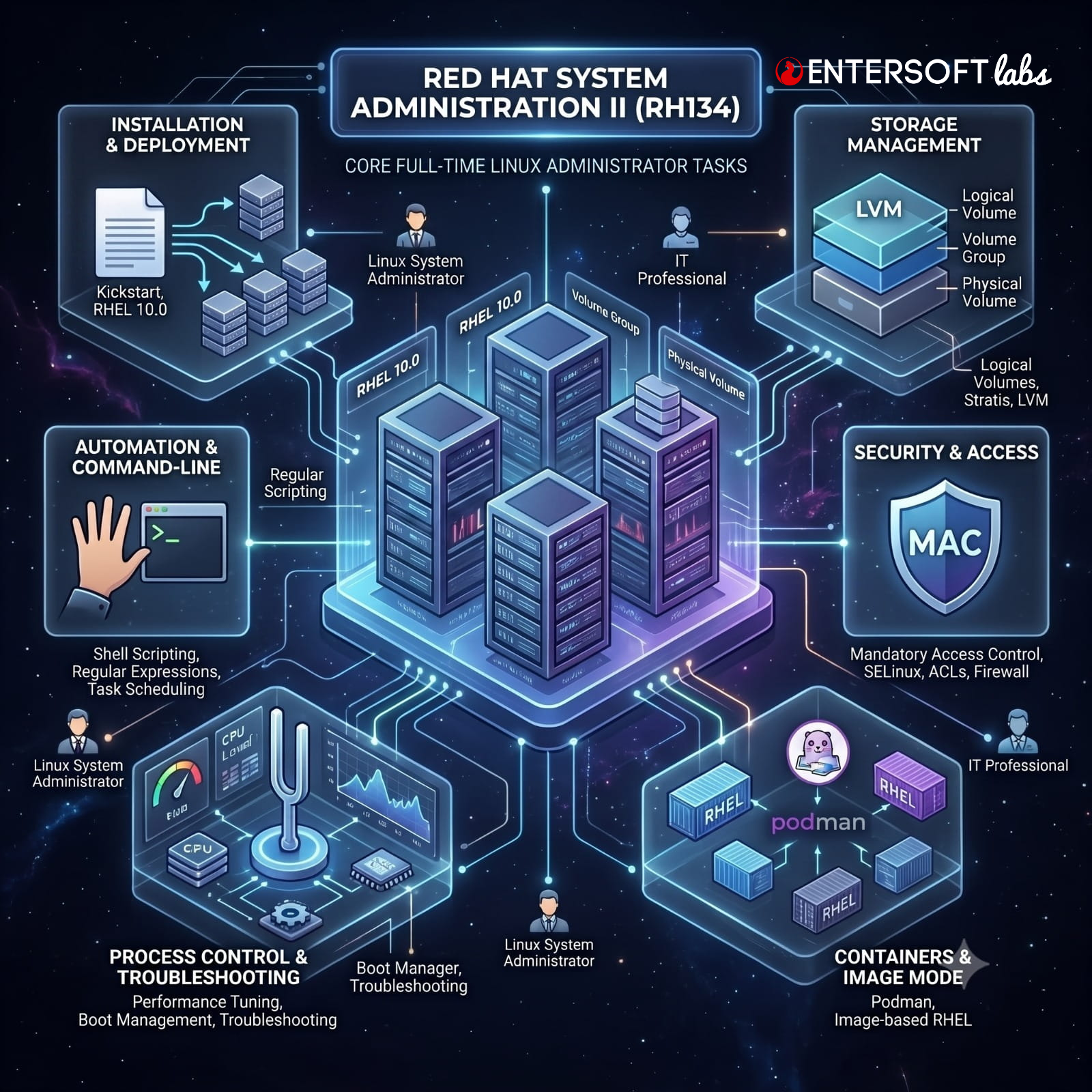
Learn essential Red Hat Enterprise Linux configuration, administration, and maintenance in a condensed format designed for experienced Linux system administrators.
The RHCSA course features Red Hat® Enterprise Linux® 10 combining essential content from Red Hat System Administration I (RH124) and Red Hat System Administration II (RH134) to help students operate, manage, and maintain a Red Hat Enterprise Linux system. The Red Hat Certified System Administrator (RHCSA) exam (EX200)
Audience
System administrators, platform engineers, developers, and other IT professionals who have limited Red Hat Enterprise Linux experience but need to perform essential Linux administration tasks on a single server, including basic competency with use of the Bash command-line shell, user and file management, software administration, management of local storage devices, and other key single-server duties
Red Hat System Administration II (RH134)
These concepts are further developed in the follow-on course, Red Hat System Administration II (RH134).
Chapter 1: Shell Scripting and the Command Line
Goal: Write and run simple shell scripts, and use shell scripting features to efficiently run commands at the shell prompt
-
-
Changing the Shell Environment
-
Guided Exercise: Change the Shell Environment
-
Writing Simple Bash Scripts
-
Guided Exercise: Write Simple Bash Scripts
-
Running Loops and Conditional Commands
-
Guided Exercise: Run Loops and Conditional Commands
-
-
-
Lab: Shell Scripting and the Command Line
-
Chapter 2: Using Regular Expressions for Practical Applications
Goal: Efficiently complete system administration tasks by using regular expressions to match text.
-
-
Matching Text with Regular Expressions
-
Guided Exercise: Match Text with Regular Expressions
-
Chapter 3: Scheduling User Tasks
Goal: Schedule programs to run in the future, either at a specific time and date or on a recurring basis, as a regular user.
-
-
Scheduling a Future User Job
-
Guided Exercise: Schedule a Future User Job
-
Scheduling Recurring User Jobs
-
Guided Exercise: Schedule Recurring User Jobs
-
Chapter 4: Scheduling System Tasks
Goal: Schedule system programs that must run on a recurring basis to support daemons or operating system functions.
-
-
Managing Repeating Jobs by Using System Timer Units
-
Guided Exercise: Manage Repeating Jobs by Using System Timer Units
-
Managing Temporary Files
-
Guided Exercise: Manage Temporary Files
-
Scheduling Recurring System Tasks with Cron
-
Guided Exercise: Schedule a Recurring System Task with Cron
-
Chapter 5: Analyzing and Storing Logs
Goal: Locate and interpret system logs for troubleshooting purposes, and ensure accurate timestamps for log events.
-
-
The System Log Architecture
-
Interpreting and Managing Syslog Events
-
Guided Exercise: Interpret and Manage Syslog Events
-
Finding and Interpreting System Journal Log Entries
-
Guided Exercise: Find and Interpret System Journal Log Entries
-
Configuring a Persistent System Journal
-
Guided Exercise: Configure a Persistent System Journal
-
Maintaining Synchronized Time
-
Guided Exercise: Maintain Synchronized Time
-
-
-
Lab: Analyze and Store Logs
-
Chapter 6: Managing Security with SELinux
Goal: Protect systems and manage security by using SELinux.
-
-
Operating SELinux
-
Guided Exercise: Operate SELinux
-
Controlling SELinux File Contexts
-
Guided Exercise: Control SELinux File Contexts
-
Tuning the SELinux Policy by Adjusting Booleans
-
Guided Exercise: Tune the SELinux Policy by Adjusting Booleans
-
Investigating and Resolving SELinux Issues
-
Guided Exercise: Investigate and Resolve SELinux Issues
-
-
-
Lab: Manage Security with SELinux
-
Chapter 7: Archiving Files
Goal: Create compressed archives of files so that they can be backed up and transferred to other systems.
-
-
Managing Compressed Tar Archives
-
Guided Exercise: Manage Compressed Tar Archives
-
Chapter 8: Transferring Files
Goal: Securely transfer files from one system to another.
-
-
Transferring Files Between Systems
-
Guided Exercise: Transfer Files Between Systems
-
Synchronizing Content Between Systems
-
Guided Exercise: Synchronize Content Between Systems
-
-
-
Lab: Transfer Files
-
Chapter 9: Tuning System Performance
Goal: Improve system performance by setting a tuning profile and by adjusting the scheduling priority of specific processes
-
-
Setting a Tuning Profile
-
Guided Exercise: Set a Tuning Profile
-
Influencing Process Scheduling
-
Guided Exercise: Influence Process Scheduling
-
-
-
Lab: Tune System Performance
-
Chapter 10: Managing Basic Storage
Goal: Manage storage devices by creating partitions, file systems, and swap spaces from the command line.
-
-
Creating and Managing File Systems on Standard Partitions
-
Guided Exercise: Create and Manage File Systems on Standard Partitions
-
Managing Swap Space
-
Guided Exercise: Manage Swap Space
-
-
-
Lab: Manage Basic Storage
-
Chapter 11: Managing Storage with Logical Volume Manager
Goal: Use Logical Volume Manager (LVM) to manage logical volumes that can contain file systems and swap spaces.
-
-
Creating Logical Volumes
-
Guided Exercise: Create Logical Volumes
-
Extending a Logical Volume
-
Guided Exercise: Extend a Logical Volume
-
Replacing Physical Volumes and Managing LVM
-
-
-
Lab: Manage Storage with Logical Volume Manager
-
Chapter 12: Controlling and Troubleshooting the Boot Process
Goal: Manage how the system boots to control which services start and to troubleshoot and repair boot-time problems
-
-
Managing the Boot Loader and Kernel Command Line
-
Guided Exercise: Manage the Boot Loader and Kernel Command Line
-
Exploring the Boot Process and Selecting a Boot Target
-
Guided Exercise: Explore the Boot Process and Select a Boot Target
-
Repairing Damaged File Systems at Boot Time
-
Guided Exercise: Repair a Damaged File System at Boot Time
-
-
-
Lab: Control and Troubleshoot the Boot Process
-
Chapter 13: Recovering Superuser Access
Goal: Gain administrative access to a system when the superuser password is unknown or locked.
-
-
Regaining Superuser Access and Resetting the Root Password
-
Guided Exercise: Regain Superuser Access and Reset the Root Password
-
Chapter 14: Managing Network Security
Goal: Control network connections to services by using the system firewall, and network services that can bind to particular ports by using SELinux
-
-
Managing Server Firewalls
-
Guided Exercise: Manage a Server Firewall
-
SELinux Port Labeling
-
Guided Exercise: SELinux Port Labeling
-
-
-
Lab: Manage Network Security
-
Chapter 15: Accessing Network-attached Storage
Goal: Access network-attached storage that the Network File System (NFS) protocol provides, either manually or by using the automounter.
-
-
Mounting NFS File Systems
-
Guided Exercise: Mount NFS File Systems
-
Automounting Storage Devices
-
Guided Exercise: Automount Storage Devices
-
-
-
Lab: Access Network-attached Storage
-
Chapter 16: Installing Red Hat Enterprise Linux
Goal: Install Red Hat Enterprise Linux in package mode, either interactively or by using Kickstart.
-
-
Installing Red Hat Enterprise Linux Interactively
-
Guided Exercise: Install Red Hat Enterprise Linux Interactively
-
Automating Red Hat Enterprise Linux Installation with Kickstart
-
Guided Exercise: Automate Red Hat Enterprise Linux Installation with Kickstart
-
Chapter 17: Managing Containers with Podman
Goal: Manage containers and container images with the latest version of container management tools.
-
-
Introduction to Containers
-
Running Containers with Podman
-
Guided Exercise: Run Containers with Podman
-
Creating and Managing Container Images
-
Guided Exercise: Create and Manage Container Images
-
-
-
Lab: Manage Containers with Podman
-
Chapter 18: Working with Image-based Red Hat Enterprise Linux
Goal: Create, use, install, and upgrade containers and servers that use image-based installation management.
-
-
Image Mode for Red Hat Enterprise Linux
-
Creating Installable Images for Image Mode
-
Guided Exercise: Create Installable Images for Image Mode
-
Installing Red Hat Enterprise Linux by Using Image Mode
-
Guided Exercise: Install Red Hat Enterprise Linux by Using Image Mode
-
Managing Image Mode-based Systems
-
Guided Exercise: Manage Image Mode-based Systems
-
Chapter 19: Comprehensive Review
Goal: Review tasks from Red Hat System Administration II.
-
-
Lab: Fix Boot Issues and Maintain Servers
-
Lab: Configure and Manage File Systems and Storage
-
Lab: Configure and Manage Server Security
-
Lab: Run Containers
-
Additional Concepts will be covered @ Entersoft Labs in RHCSA Course:
-
-
Installing and Configuring Telnet Server and Telnet Client
-
Installing and Configuring VSFTPD Server and FTP Client
-
Installing and Configuring Web Server (HTTPD)
-
Installing and Configuring Database Server (MariaDB)
-
Installation and Configuration of YUM/DNF Server
-
Recommended next exam or course
Red Hat Certified System Administrator exam (EX200) @ 3 hrs. Exam Red Hat Enterprise Linux Automation with Ansible (AU294) to become RHCE